























How to Unlock Huawei 4G Mobile WiFi 5 (E5586 Series) with Version 5 Code (2026 Guide)
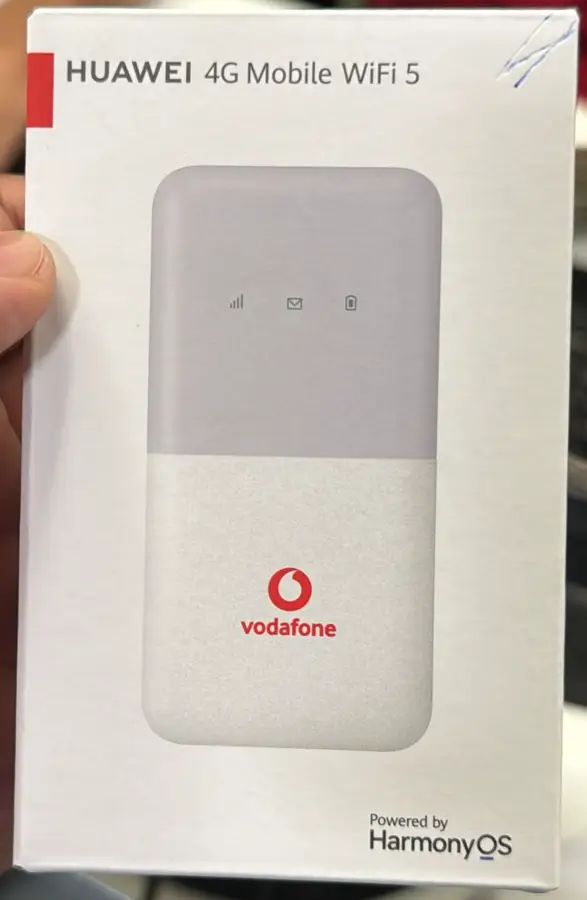
The Huawei 4G Mobile WiFi 5 series is Huawei’s latest generation of portable hotspot devices, powered by HarmonyOS instead of the traditional Huawei HiLink firmware. Models include the E5586, E5586-326, E5586-822, and E5586-926 — commonly sold through carriers like Vodafone, Three, Orange, and Zain.
Table of Contents
These devices ship carrier-locked and require a Version 5 (V5) unlock code — a 16-digit alphanumeric key generated from your IMEI. This guide walks you through the complete unlock process.
Supported E5586 Models
| Model | Common Carrier | OS | Key Feature |
|---|---|---|---|
| E5586 | Various | HarmonyOS | Base model, Wi-Fi 5, 150 Mbps |
| E5586-326 | Vodafone Europe | HarmonyOS | Color display, 10-hour battery |
| E5586-822 | Middle East / Asia | HarmonyOS | Dual-band Wi-Fi, 16 devices |
| E5586-926 | Various | HarmonyOS | Global variant |
What Makes the E5586 Different?
Unlike older Huawei MiFi devices that use the HiLink web interface, the E5586 series runs HarmonyOS with a redesigned interface. Key differences:
- Color touchscreen on the device itself for basic settings
- HarmonyOS web interface at 192.168.8.1 (looks different from older models)
- Requires Algorithm Version 5 unlock code — older V1–V4 codes will not work
- The V5 code is 16 digits, alphanumeric (letters and numbers)
How to Unlock Your Huawei E5586
Connect to Your Device
- Power on your Huawei Mobile WiFi 5 device
- Connect to its WiFi network from your phone or computer — the SSID and password are on the device label or inside the battery compartment
Access the Web Interface
- Open a browser and go to 192.168.8.1
- Log in with default credentials — typically admin / admin
Find Your IMEI Number
- Navigate to About or Device Information
- Copy the 15-digit IMEI number
- Alternatively, check the sticker inside the battery compartment
Purchase Your V5 Unlock Code
- Go to our Huawei V5 Unlock Code page
- Enter your IMEI number and email address
- Complete the payment — your 16-digit V5 code will be delivered to your email
Enter the Unlock Code
- Insert a SIM card from a different carrier (not the original locked provider)
- Power on the device — the web interface will prompt for an unlock code
- Enter the 16-digit V5 code and click Unlock
- Your device is now permanently unlocked
Configure APN Settings (If Needed)
If the internet does not connect automatically after unlocking:
- Go to Settings > Mobile Network > APN Settings in the web interface
- Add a new APN profile with your carrier’s details:
- APN Name: Your carrier’s APN (e.g., “internet”, “web”, “data”)
- Username / Password: Enter if required by your carrier
- Save and restart the device
Frequently Asked Questions
Can I use a V3 or V4 code on the E5586?
No. The E5586 series uses Algorithm Version 5 exclusively. Older V1–V4 codes will be rejected. You must use a V5 code.
Is the unlock permanent?
Yes. The V5 unlock persists through firmware updates, factory resets, and SIM changes. You will never need to re-enter the code.
My device is locked to Vodafone — will this work?
Yes. Our V5 codes work for E5586 devices locked to any carrier worldwide, including Vodafone, Three, Orange, Zain, STC, and all others.
How long does delivery take?
Most codes are delivered within 1 to 24 hours. Some may take up to 48 hours depending on the model variant.
Additional Huawei Sub-Models We Now Support
The Huawei 4G Mobile WiFi 5 (E5586 series) models below were recently added to our supported devices list. The unlock procedure is identical to the one described above — submit the IMEI, pay, and receive the unlock code by email within the stated delivery window.
- E5586-526 — sub-variant of E5586 (Africa/Middle East variant)
If your exact model isn’t listed, run a free IMEI check first — our database is updated weekly and many newer variants are supported even if they aren’t named yet.
Watch: E5586 Unlock Demonstration
Get Your E5586 Unlocked Today
Contact us through any of the channels below — we are available 24/7.

2 Comments
zte mc 888 aultra stc saudi arabia can unlock it
If the router is requesting for unlock code and there is still an update left to enter the code, then go ahead and buy code.
Software unlock is not yet available, you can message on telegram or WhatsApp +233555220441 check whenever the software method is available.