How to Unlock the Netgear MR7400 / Nighthawk M7 Pro 5G Router (2026 Guide)
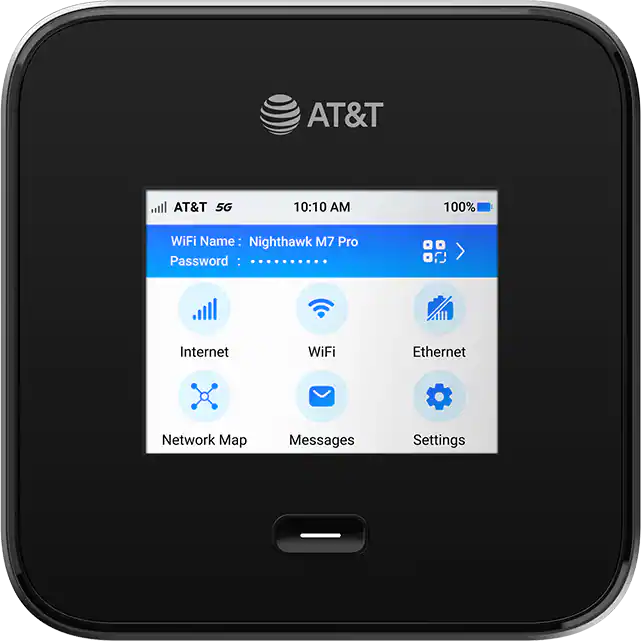
The Netgear MR7400 — sold as the Nighthawk M7 Pro in many markets — is a flagship 5G mobile router that replaced the long-running MR1100 (M1) and MR2100 (M2) lineup. It supports 5G Sub-6 + mmWave, Wi-Fi 6E, and dual SIM in a portable hotspot form factor.
Table of Contents
It is also one of the more difficult devices in this category to unlock or service. Carrier-locked variants from Telstra (Australia), Optus (Australia), Bell (Canada), Rogers (Canada), Three (UK), EE (UK), and several US carriers ship with a tightly restricted firmware that doesn’t respond to the unlock methods that worked on earlier Nighthawk models.
This guide covers what we offer for the MR7400 — SIM/carrier unlock (by code or remote), firmware repair, IMEI restore, TTL change, and dead/bricked recovery — plus background on why this device needs more involved service procedures than older routers.
Services We Offer for the MR7400
| Service | What It Solves | Method |
|---|---|---|
| Carrier / SIM Unlock by Code | Use any SIM worldwide (when router prompts for code) | NCK code emailed to you |
| Carrier / SIM Unlock — Remote | Use any SIM worldwide (when router does not prompt) | Remote (AnyDesk / TeamViewer) |
| Firmware Repair | Stuck on logo, boot loop, won’t power on, won’t connect | Remote |
| Dead / Bricked Recovery | Failed firmware update, EDL mode, no display | Remote |
| IMEI Restore | Invalid IMEI, “00000000…” IMEI, no service after repair | Remote |
| TTL Change | Carrier blocks tethering / hotspot detection | Remote |
| Band Unlock | Lock to specific 4G/5G band, enable hidden bands | Remote |
| Carrier Aggregation Unlock | Enable multi-band CA disabled by carrier firmware | Remote |
Quick Facts: Netgear MR7400 (Nighthawk M7 Pro)
| Spec | Detail |
|---|---|
| Model number | MR7400 |
| Marketing name | Nighthawk M7 Pro |
| Network | 5G Sub-6 + mmWave, 4G LTE Cat 22 |
| Wi-Fi | Wi-Fi 6E (tri-band) |
| Battery | 5040 mAh removable |
| Display | 2.8″ colour touchscreen |
| Connected devices | Up to 32 simultaneously |
| Carriers locked to | Telstra, Optus, Bell, Rogers, Three UK, EE, AT&T, others |
| Released | 2024 |
Why the MR7400 Needs a Different Approach
Earlier Netgear/Sierra Nighthawk routers (MR1100, MR2100, MR5100, MR5200, MR6110, MR6150) accepted standard NCK codes, allowed firmware downgrades, or exposed an AT-command interface that could be used for unlocking. The MR7400’s firmware closes those routes:
- Signed bootloader — the device verifies a cryptographic signature on every firmware image, so older or modified firmware is rejected.
- Diagnostic port disabled — the AT-command interface that used to be available over USB is turned off in shipping firmware.
- Encrypted configuration storage — the partition that holds the SIM lock, IMEI, and TTL values is protected with a per-device key, so generic edit tools no longer reach it.
- Server-side activation — Telstra and Bell variants check in with the carrier server on every boot, so a local change can be reverted over the air if it isn’t done correctly.
The result is that generic unlock code generators don’t produce a working code for the MR7400, and standard service-tool procedures that worked on older Nighthawks do not apply here. Service for this model needs a workflow that accounts for these protections.
How Our Service Works
Our MR7400 service uses an internal workflow we’ve put together specifically for this model. We don’t publish the technical detail, but here’s what’s relevant if you’re considering a job:
- The unlock or repair is permanent and survives factory reset and carrier OTA updates.
- For services that need a live session, we connect over AnyDesk or TeamViewer — your device stays with you.
- For SIM unlocks and TTL changes, we don’t reflash firmware. The router stays on its shipped firmware, fully functional.
- Brick recovery is also available where the device is in EDL / boot loop / failed update state.
- We’ve completed jobs across Telstra, Optus, Bell, Rogers, Three UK, EE, and US variants.
- Most jobs complete in 30–60 minutes from the start of the session.
Two ways the unlock specifically can be delivered, depending on your router’s firmware:
- Unlock by Code — if your MR7400 prompts for a network unlock code when you insert a foreign SIM, we generate an NCK from your IMEI and email it to you. You enter it in the web interface at 192.168.1.1. No remote session needed.
- Remote Unlock — if the router does not prompt for a code (most current carrier firmware behaves this way), we connect over AnyDesk and complete the unlock on a live call.
Not sure which one applies? Insert a non-original SIM and power the router on. If it asks for a code, choose unlock-by-code. If it accepts the SIM but only works on the original carrier, choose remote.
What You Need
- The MR7400 router and its 15-digit IMEI (label under the battery — or whatever the router currently shows if the IMEI is missing or corrupted)
- A non-original SIM ready to test after the unlock
- For remote services: a Windows PC with a USB-C cable and either AnyDesk or TeamViewer
How to Order — Unlock by Code
- Find your IMEI: insert your SIM, power on, open 192.168.1.1, log in, copy the 15-digit IMEI from About / Device Information
- Visit our Netgear Unlock Code page and select MR7400 / Nighthawk M7 Pro
- Enter your IMEI and email, complete payment
- We email the NCK code, usually within 1–24 hours
- Insert a non-original SIM, enter the code when prompted, click Apply
How to Order — Remote Unlock or Repair
- Visit our Remote Unlock page
- Select Netgear MR7400 / Nighthawk M7 Pro and the service you need (remote unlock, IMEI restore, TTL change, firmware repair)
- Enter your IMEI and email, complete payment (Card, Crypto, Binance Pay, or M-Pesa)
- You’ll receive a confirmation email with a booking link to schedule the AnyDesk session
- We perform the job live on the call and verify the result before ending the session
Frequently Asked Questions
How do I know whether to buy the code or remote unlock?
Insert a non-original SIM and power the router on. If the web interface (192.168.1.1) prompts for a network unlock code, choose Unlock by Code. If it accepts the SIM without asking but the SIM only works on your original carrier, choose Remote Unlock. If you’re not sure, message us your IMEI and current firmware version and we’ll tell you which one applies.
Will Netgear or my carrier reverse the change?
No. Our procedures are designed to survive carrier OTA updates and factory resets.
My MR7400 is dead / stuck in boot loop / showing “EDL” on USB. Can you fix it?
In most cases yes. Order the Firmware Repair / Brick Recovery service. We’ll diagnose on a free pre-call before charging.
My IMEI shows “000000000000000” or “404” after a previous repair attempt — can you restore it?
Yes. We rewrite a valid IMEI bound to the device’s hardware identifiers so the router registers normally on the network.
Why do I need a TTL change?
Some carriers (especially in the US, AU, and CA) inspect the TTL value of outbound packets to detect tethering. Setting a fixed TTL at the router level keeps tethered traffic looking like it came directly from a phone, which avoids hotspot blocking or speed throttling on plans where that matters.
What about the Nighthawk M7 (MR7100) — is that the same device?
No. The MR7100 is a different model that uses an older Sierra Wireless modem and is unlockable with a standard NCK code. See our Netgear Nighthawk & Sierra Wireless unlock guide for those models.
Why is the MR7400 service priced higher than other Nighthawk routers?
The procedure is more involved than a standard NCK unlock and (for remote services) requires a live session per device. The pricing reflects the extra time and tooling required.
Do you offer a refund if it doesn’t work?
Yes. If we cannot complete the service on your specific MR7400, we issue a full refund.
Can I do this myself?
The procedures we use rely on tooling we maintain in-house, so we don’t have a self-serve option to recommend. If you’re set on doing it yourself, the major modding forums (GSMHosting, XDA, 4PDA) are the best places to track community progress on this device.
Carriers We’ve Serviced
| Region | Carrier | Variant | Status |
|---|---|---|---|
| Australia | Telstra | MR7400-100AUS | ✅ Confirmed |
| Australia | Optus | MR7400-100AUS | ✅ Confirmed |
| Canada | Bell | MR7400-100CAN | ✅ Confirmed |
| Canada | Rogers | MR7400-100CAN | ✅ Confirmed |
| UK | Three | MR7400-100EUS | ✅ Confirmed |
| UK | EE | MR7400-100EUS | ✅ Confirmed |
| USA | AT&T | MR7400-100NAS | ✅ Confirmed |
Get in Touch
Whether you need it unlocked, repaired, IMEI-fixed, or TTL-modded — we’re available 24/7.
Additional Netgear Sub-Models We Now Support
The Netgear MR7400 / Nighthawk M7 Pro 5G router models below were recently added to our supported devices list. The unlock procedure is identical to the one described above — submit the IMEI, pay, and receive the unlock code by email within the stated delivery window.
- MR1100-330 — sub-variant of MR1100 (Asia-Pacific variant)
- MR2100-100 — sub-variant of the MR2100 family
If your exact model isn’t listed, run a free IMEI check first — our database is updated weekly and many newer variants are supported even if they aren’t named yet.