How to Unlock Huawei 5G Mobile WiFi E6878 Series with V5 Code (2026 Guide)
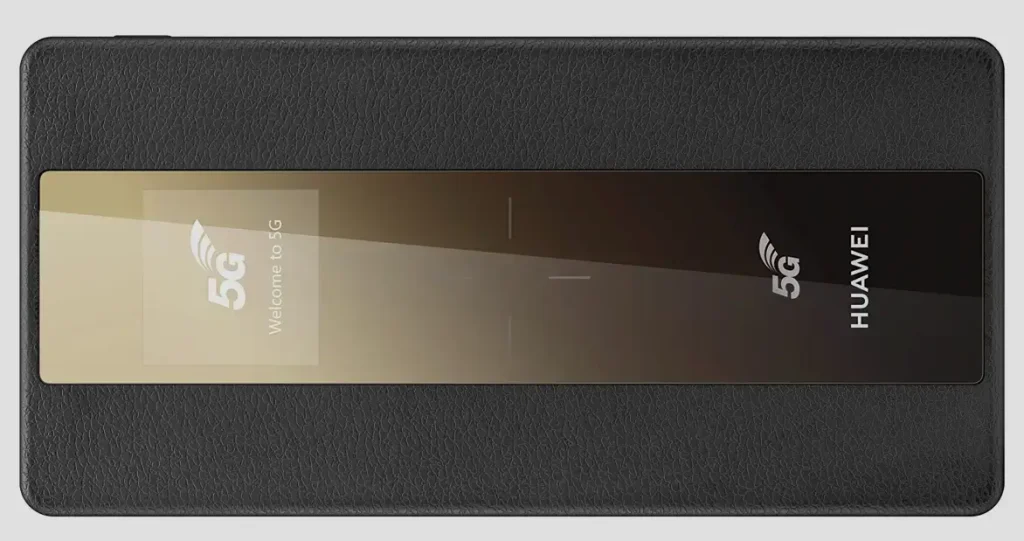
The Huawei E6878 series is Huawei’s flagship 5G portable hotspot lineup, powered by the Balong 5000 7nm multi-mode chipset — the same chip inside the Huawei 5G CPE Pro routers. These pocket-sized devices deliver 5G download speeds up to 1.65 Gbps, support 4K 60fps live streaming, and can even wirelessly charge other devices.
Table of Contents
Carriers like Zain, STC, du, Etisalat, Vodafone, and Orange sell these devices locked to their network. Unlocking requires a Version 5 (V5) unlock code — a 16-digit alphanumeric key that permanently removes the SIM restriction.
Supported Models
| Model | Chipset | Battery | Charging | Key Feature |
|---|---|---|---|---|
| E6878-870 | Balong 5000 (7nm) | 4,000 mAh | 18W Quick Charge | Compact 5G hotspot, dual-band Wi-Fi |
| E6878-370 (Pro) | Balong 5000 (7nm) | 8,000 mAh | 40W Wired / 22.5W Reverse / 15W Wireless | Power bank function, wireless reverse charging |
| E6878-380 | Balong 5000 (7nm) | 4,000 mAh | 18W Quick Charge | Regional variant |
| E6878-866 | Balong 5000 (7nm) | 4,000 mAh | 18W Quick Charge | Carrier-specific variant |
| E6888-982 | Balong 5000 | 4,000 mAh | Quick Charge | Next-gen successor |
| Swilink SRT873 | Balong 5000 | 4,000 mAh | Quick Charge | Carrier-rebranded E6878 |
E6878-870 vs E6878-370 (Pro): What’s the Difference?
Both models share the same Balong 5000 chipset and 5G performance. The key differences are:
| Feature | E6878-870 | E6878-370 (Pro) |
|---|---|---|
| Battery | 4,000 mAh | 8,000 mAh (2x larger) |
| Wired Charging | 18W | 40W SuperCharge |
| Reverse Charging | No | 22.5W wired + 15W wireless |
| Power Bank Mode | No | Yes — charges phones and tablets |
| Standby | Up to 20 days | Up to 20 days |
The E6878-370 Pro is ideal if you need extended battery life and want to use the hotspot as a portable power bank for your other devices.
How to Unlock Your Huawei E6878
Access the Web Interface
- Power on your E6878 device
- Connect via Wi-Fi or USB cable
- Open a browser and go to 192.168.8.1
- Log in with default credentials — typically admin / admin
Find Your IMEI Number
- Go to Device Information or About
- Copy the 15-digit IMEI number
- Alternatively, check the sticker under the battery cover
Purchase Your V5 Unlock Code
- Go to our Huawei V5 Unlock Code page
- Enter your IMEI number and email address
- Complete the payment — your 16-digit V5 code will be delivered to your email
Insert a New SIM Card
- Power off the device
- Remove the original SIM and insert a SIM from a different carrier
- Power it back on
Enter the Unlock Code
- The web interface will prompt for an unlock code
- Enter the 16-digit V5 code and click Submit
- Your device is now permanently unlocked
Configure APN Settings (If Needed)
If the device does not auto-connect after unlocking:
- Go to Settings > Network > APN
- Create a new APN profile with your carrier’s settings
- Save and restart
Frequently Asked Questions
Can I use the E6878 as a power bank after unlocking?
Yes. The E6878-370 Pro’s reverse charging feature (22.5W wired, 15W wireless) works independently of the SIM lock. Unlocking does not affect any device features.
Is the V5 code the same for all E6878 variants?
No. Each V5 code is unique to your IMEI number. A code generated for one E6878 will not work on another. Always provide your exact IMEI when ordering.
My device is locked to Zain — will this work?
Yes. We have a 100% success rate unlocking Zain-locked E6878 devices. The code also works for STC, du, Etisalat, Vodafone, and all other carriers.
Is the unlock permanent?
Yes. The V5 unlock persists through firmware updates, factory resets, and SIM changes.
Additional Huawei Sub-Models We Now Support
The Huawei 5G Mobile WiFi models below were recently added to our supported devices list. The unlock procedure is identical to the one described above — submit the IMEI, pay, and receive the unlock code by email within the stated delivery window.
- E6898-886 — 5G pocket MiFi (E6878 successor)
If your exact model isn’t listed, run a free IMEI check first — our database is updated weekly and many newer variants are supported even if they aren’t named yet.
Watch: E6878 Unlock Demonstration
Get Your E6878 Unlocked Today
Contact us through any of the channels below — we are available 24/7.