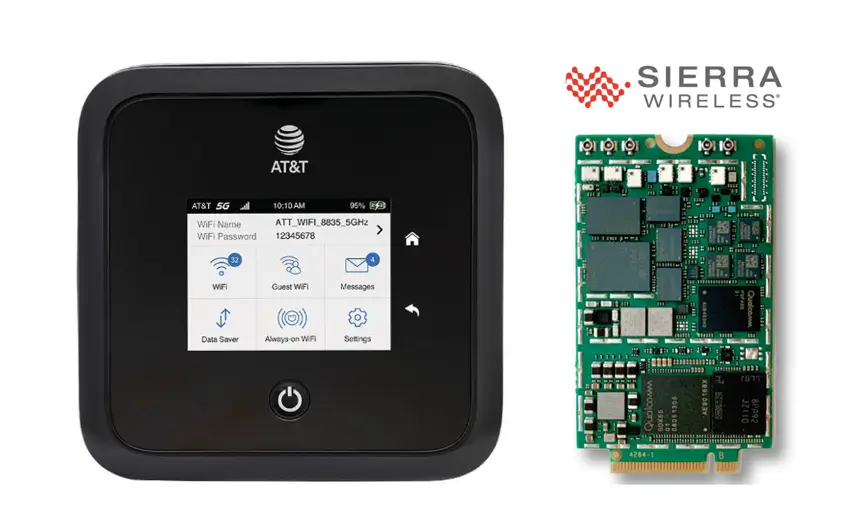
Netgear Nighthawk and Sierra Wireless routers are among the most powerful mobile hotspot devices on the market, delivering 4G LTE and 5G connectivity for travelers, remote workers, and businesses. However, most units ship carrier-locked to networks like AT&T, T-Mobile, EE, Telstra, or Vodafone — restricting you to a single provider.
Table of Contents
Network unlocking removes this restriction, allowing you to insert any SIM card from any carrier worldwide. Whether you purchased a Netgear Nighthawk M1, M2, M5, M6, or the latest M7 Pro — or a Sierra Wireless embedded module — this guide covers everything you need to know about unlocking your device safely and quickly.
Why Unlock Your Netgear or Sierra Wireless Router?
A locked router limits you to one network provider. Unlocking gives you:
- Freedom to use any SIM card — switch between carriers for the best coverage and pricing in your area
- International travel flexibility — use local SIM cards abroad instead of expensive roaming plans
- Higher resale value — unlocked devices sell for significantly more on the secondhand market
- No service contract dependency — you are not tied to any carrier agreement after unlocking
Supported Netgear Nighthawk Models
We support the full range of Netgear mobile hotspot routers, from legacy Aircard units to the latest Nighthawk 5G Wi-Fi 7 devices:
Netgear Nighthawk 5G Series
| Model | Marketing Name | Network | Key Specs |
|---|---|---|---|
| MR7500 | Nighthawk M7 Ultra | 5G Sub-6 / mmWave | Wi-Fi 7, Snapdragon X75, up to 6.4 Gbps |
| MR7400 | Nighthawk M7 Pro | 5G Sub-6 / mmWave | Wi-Fi 7, up to 6 Gbps, 64 devices |
| MR6550 | Nighthawk M6 Pro (multi-carrier) | 5G Sub-6 / mmWave | Wi-Fi 6E, Qualcomm X65, 2.5 Gbps Ethernet |
| MR6500 | Nighthawk M6 Pro (AT&T) | 5G Sub-6 / mmWave | Wi-Fi 6E, Qualcomm X65, 8 Gbps |
| MR6400 | Nighthawk M6 (AT&T) | 5G Sub-6 | Wi-Fi 6, AT&T variant |
| MR6150 | Nighthawk M6 | 5G Sub-6 | Wi-Fi 6, up to 32 devices |
| MR6110 | Nighthawk M6 | 5G Sub-6 | Wi-Fi 6, budget 5G option |
| MR5200 | Nighthawk M5 | 5G Sub-6 | Wi-Fi 6, Qualcomm X55 |
| MR5100 | Nighthawk M5 | 5G Sub-6 | Wi-Fi 6, portable design |
| MR5000 | Nighthawk M5 Fusion | 5G Sub-6 | Wi-Fi 6, DSS support |
Netgear Nighthawk 4G LTE Series
| Model | Marketing Name | Network | Key Specs |
|---|---|---|---|
| MR2100 | Nighthawk M2 | 4G LTE Cat 20 | Wi-Fi 5, 2 Gbps download, touchscreen |
| MR1100 | Nighthawk M1 | 4G LTE Cat 16 | Wi-Fi 5, 1 Gbps download, Ethernet port |
| AC810S | Aircard 810S | 4G LTE Cat 11 | Wi-Fi 5, 600 Mbps download |
| AC797S | Aircard 797S | 4G LTE Cat 13 | Wi-Fi 5, portable hotspot |
| AC790S | Aircard 790S | 4G LTE Cat 6 | Wi-Fi 5, touchscreen |
| AC785S | Aircard 785S | 4G LTE Cat 6 | Wi-Fi 4, compact design |
Netgear Aircard Legacy Models
We also unlock older Netgear Aircard models including: 815S, 800S, 791L, 782S, 781S, 779S, 778S, 771S, and other variants. If your model is not listed, contact us on WhatsApp to confirm compatibility.
Supported Sierra Wireless Models
Sierra Wireless (now part of Semtech) produces embedded LTE/5G modules used in enterprise routers, laptops, and IoT gateways. These modules are frequently carrier-locked and require specialized unlocking tools. We support:
Embedded Modules
| Model | Category | Network | Common Use |
|---|---|---|---|
| EM7565 | M.2 Module | 4G LTE Cat 12 | Laptops, enterprise routers, IoT gateways |
| EM7511 | M.2 Module | 4G LTE-A Pro | FirstNet / public safety devices |
| EM7455 | M.2 Module | 4G LTE Cat 6 | Lenovo ThinkPad, Dell Latitude laptops |
| MC7455 | Mini PCIe Module | 4G LTE Cat 6 | Industrial routers, embedded systems |
Sierra Wireless Aircard Hotspots
We also unlock Sierra Wireless mobile hotspot devices: Aircard 770S, 763S, 762S, 760S, 754S, and the AirLink MG90 enterprise gateway.
How We Unlock Your Router
Our remote unlocking process is fast, safe, and does not void your device warranty. Here is how it works:
Install Remote Access Software
Download and install one of the following remote desktop applications on your computer:
- AnyDesk — lightweight, fast connection (recommended)
- RustDesk — open-source, privacy-focused alternative
- TeamViewer — widely used remote desktop tool
Connect Your Router to Your Computer
Connect your Netgear or Sierra Wireless device to your computer via USB cable. Ensure the device is powered on and detected by your operating system. For embedded modules (EM7455, EM7565), the module should be installed in a USB-to-M.2 or USB-to-Mini-PCIe adapter.
Share Your Remote Access ID
Send us your AnyDesk, RustDesk, or TeamViewer connection ID via WhatsApp or Telegram. Our technician will securely connect to your computer and perform the unlock procedure.
Unlock Complete
The entire process typically takes 5 to 15 minutes. Once complete, your device accepts any SIM card from any carrier in the world. You will see the new network appear immediately after inserting a different SIM.
Frequently Asked Questions
Is unlocking my Netgear router legal?
Yes. Network unlocking is legal in most countries, including the United States, United Kingdom, and the European Union. It allows you to use your purchased device with the carrier of your choice.
Will unlocking void my warranty?
No. Our remote unlocking method uses the same official carrier-unlock mechanism that network providers use internally — no firmware changes, no warranty impact.
What if my model is not listed?
Contact us with your device model number and IMEI. We support many additional Netgear and Sierra Wireless variants not listed on this page and can confirm compatibility within minutes.
How long does the unlock take?
Most unlocks are completed in 5 to 15 minutes via remote desktop. For embedded modules requiring firmware changes, the process may take up to 30 minutes.
Do I need technical knowledge?
No. You only need to install a remote desktop application and connect your router to your computer via USB. Our technician handles everything else.
Watch the Unlock Process
See a live demonstration of our remote Netgear and Sierra Wireless router unlock service:
Ready to Unlock Your Router?
Get your Netgear Nighthawk or Sierra Wireless device unlocked today. Contact us through any of the channels below — we are available 24/7 and most unlocks are completed within minutes.
Additional Netgear / Sierra Wireless Sub-Models We Now Support
The Netgear AirCard models below were recently added to our supported devices list. The unlock procedure is identical to the one described above — submit the IMEI, pay, and receive the unlock code by email within the stated delivery window.
- AC770S — AirCard 770S — global 4G LTE mobile hotspot
- AC779S-200 — AirCard 779S-200 — Cat11 LTE mobile hotspot
- AC785S-200 — AirCard 785S-200 — international 4G mobile hotspot
- AC790S-100 — AirCard 790S-100 — Cat6 LTE mobile hotspot
If your exact model isn’t listed, run a free IMEI check first — our database is updated weekly and many newer variants are supported even if they aren’t named yet.